
Turn what you read into vocabulary you keep
Lingy turns Kindle and Kobo highlights, PDFs, YouTube videos, podcasts and photos into AI flashcards with audio and example sentences — then brings each word back just before you'd forget it.
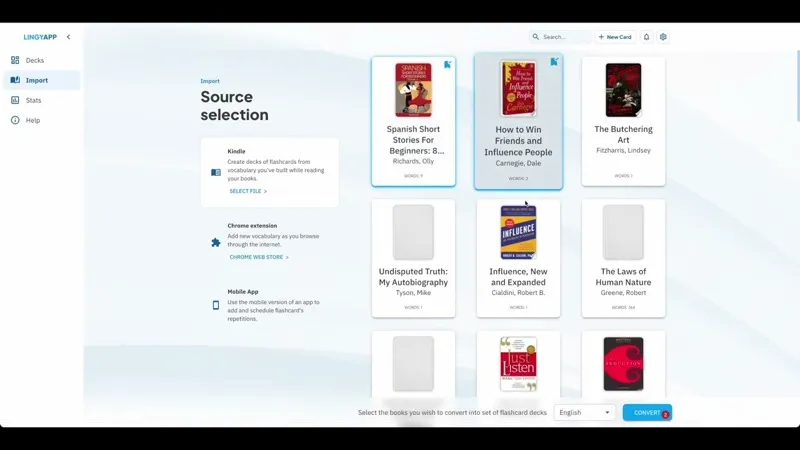
How Lingy works
From the words you meet to the words you keep
Most vocabulary apps hand you a fixed word list. Lingy starts from material you already read and watched, writes a full card for every word you save, and brings each one back at the moment you're about to forget it.
Collect words from anywhere
Import the vocabulary database from your Kindle or Kobo, or a CSV, PDF, YouTube video, audio file or photo. While browsing, press ⌘ (or Ctrl) and double-click any word to save it with the Chrome extension.
Let AI build the card
Lingy writes a definition, pronunciation audio, three example sentences with the key words blanked out, synonyms, antonyms and a memory aid — based on the sentence you found the word in, not a generic word list.
Review on a schedule that adapts
Words you struggle with come back sooner; words you've got come back later. Answer with buttons, type the word yourself, or say it out loud — then see your progress build over time.
Languages
Lingy supports 16 languages
Choose your plan
Simple plans — one low monthly price. Upgrade anytime.
Basic
$5/mo
- Chrome extension for saving words while you browse
- Study in any browser — your decks sync across every device
- Import from Kindle, Kobo, CSV, PDF, YouTube, audio and photos
Standard
$12/mo
- Chrome extension for saving words while you browse
- Import from Kindle, Kobo, CSV, PDF, YouTube, audio and photos
- AI cards with definitions, audio, synonyms, antonyms and example sentences
- Publish publicly
Premium
$25/mo
- Import from Kindle, Kobo, CSV, PDF, YouTube, audio and photos
- AI cards with definitions, audio, synonyms, antonyms and example sentences
- AI stories written from words you've learned, with audio and illustrations
- Publish publicly
Free
- Chrome extension for saving words while you browse
- Study in any browser — your decks sync across every device
- Upgrade to publish
Ready to master a new language?
Start free with 5 new cards and 20 reviews a day. Upgrade whenever you want bigger decks.
FAQ
Questions learners ask about Lingy.app
What Lingy does, what you can put into it, how the review schedule works, and what each plan includes.
Six sources are supported: the vocabulary database from a Kindle or Kobo e-reader, CSV files, PDFs (select the text you want directly in the reader), YouTube transcripts, audio and video files, and photos or screenshots of printed text. You can also save words while browsing with the Chrome extension, or drop them into the clipboard tray and drag them onto a deck. Each source produces selectable text first, so you choose exactly which words become cards.
Lingy uses spaced repetition. When you answer a card, the app looks at how well you knew it and how long it has been since your last few attempts, then decides when that word should come back. Words you struggle with return sooner and more often; words you know well are spaced further apart so they don't crowd out the hard ones. You can answer with Again / Good / Great buttons, type the word yourself for a graded check, or say it out loud.
Once you have learned a handful of words, Lingy writes short illustrated stories that use them, with narration and a synced transcript you can tap to look words up. You can also browse public decks in the community section and add any of them to your own collection in one click, track your progress with statistics on repetitions, cards due and card maturity, and — on the Premium plan — create classes, assign decks and see per-student progress.
The free plan includes the full review engine, the Chrome extension and up to 5 new cards and 20 reviews per day across 3 decks. Basic ($5/mo) raises that to 15 and 50 across 5 decks, Standard ($12/mo) to 25 and 100 across 10 decks and adds publishing, and Premium ($25/mo) to 50 and 200 across 20 decks with up to 10,000 cards per deck. Publishing decks publicly requires Standard or above, and creating classes requires Premium.
You can study 16 languages: Chinese, German, Greek, English, Spanish, Finnish, French, Hindi, Italian, Japanese, Korean, Norwegian, Polish, Portuguese, Russian and Swedish. Because your decks come from your own sources rather than a fixed curriculum, Lingy stays useful across proficiency levels and language pairs. The app interface itself is available in those same 16 languages.
Lingy is a web app, so there is nothing to install. Open it in any browser on desktop, tablet or phone and your decks, cards and progress sync automatically across every device you sign in on. You can also add it to your home screen for a full-screen experience, and install the Chrome extension on desktop to capture words while you browse.